Showing posts with label K12. Show all posts

Thursday, 20 August 2009

Your Technology Magna Carta


It is the first day of class, students arrive and technology is present. Your students salivate at the idea of using a laptop, a smart board and a digital camera. They become attentive and are leaning in on your every word, hoping the next sentence is, “You may now get your laptops!” Students rush the COW and in the matter of minutes there is a dropped laptop, a ‘Z’ key missing and an entire laptop has mysteriously gone off the grid.


WHAT…JUST…HAPPENED!


It’s easy, you allowed students to use technology without a technology magna carta. Along with your classroom management rules, that you designed somewhere in your student teaching practicum, the technology classroom rules are just as critical. Here are a few ideas that you can incorporate on the first day of class. Not the second day, or the day after you find broke laptops, but the FIRST DAY OF CLASS!


Laptops = Responsibility

When you give each student their laptop for the year, make sure they are all numbered. Before you allow any of your students to get their grimy paws on a computer, give them a number. As soon as you get your class lists, give each student a number that corresponds with a laptop. The first time you use the laptops take the entire class back to the COW (or where ever you house your computers) and explain to them the procedures for holding, walking with and what to do when they get to their desk. Also, explain that you MUST plug in your laptop when you put it back and if you are a neat freak like me, make sure they are all facing in the same direction. When your students return to their seats, call their names out one by one and allow them to go get their laptop. Monitor their retrieval and have students point out any flaws. Finally, remind students this routine must take place daily or laptop usage will be suspended or revoked. Also remind them that any damage to the computer will come back to them.


Smart Board is NOT a White Board


If you have a smart board mounted in your room or even if you have one stationed somewhere in your room, make sure you keep it clean! Keep all dry erase markers away from it and if you use a special stylus pointer, make sure you keep it in your desk or somewhere safe.


If you are going to be absent and your smart board will be in your room, make sure you have specific substitute plans. The worst experience I have had with this is a colleague in my department getting told that his sub wrote the entire days plan on the smart board. Even worse, the sub used a sharpie marker because she could not find a dry erase marker. It was an awful cleanup! From that day forward our technology czar gave every smart board user a sign to display when we were absent. The sign said:


THIS IS A SMART BOARD


IT IS VERY EXPENSIVE


DO NOT WRITE ON THIS BOARD


Cameras and Video Equipment


Time management! If you give students a camera to use for a project, make sure you include a column in the rubric that accounts for time. I have observed teachers using camera and video equipment for a lesson and just allowing students to run off with the equipment and take two to three weeks to shoot and edit a video. Ummm…no.


Have students sign out this equipment as well, monitor their time and enforce this rule! Don’t allow them to go over the time and make sure you keep consistent with this.


Acceptable Browsing


This rule should be primarily enforced by your network administrator, however, there are loopholes. Students are more technology advanced than most of us. When you say no facebook, no chatting and no non-academic browsing to a student, they think, “ha, I can get around this.” And they can! How? It’s called a proxy server. If this is an unfamiliar term to you, click the link and read. This proxy server allows students to access most sites that a schools network has blocked. I caught many students using facebook and various chat applications throughout the class. This needs to be a zero tolerance policy. Obviously you cannot see the screens for all of your students (until I patent the double sided laptop screen), but when you do catch them quickly minimizing a window containing facebook, enforce your policy and send them back to the 20th century classroom. Give them a pencil and paper and require them to complete the same project with tools of days gone by.


These are four simple ways to protect your equipment and maintain an efficient working environment in your classroom. With great power, comes great responsibility. Make sure your students understand this power and respect the classroom tools.

Wednesday, 13 May 2009

Lindenwold Middle School Features iTeach!


In their weekly news letter, the Language Arts Department at Lindenwold Middle School, in Lindenwold, NJ featured two blog posts from iTeach. The newsletter focuses on utilizing Shelfari and Goodreads for their summer reading program. The newsletter author asks teachers to check out these new learning tools and finds both sites to be a good way to keep students accountable over the summer.

The author also covers the Animoto post and encourages teachers who are hesitant about making videos in the classroom, to try this new tool and experience the ease of the application.

Please let me know if you are featuring iTeach in any of your school publications! It not only helps promote new teaching ideas throughout your school but increases my smile along with my ever expanding ego :)

Thanks to all who share and collaborate new teaching ideas!

Thursday, 7 May 2009

Book 2.0

Today's post is not so much of a lesson, but what will become the future of reading. I'm referring to the Kindle from Amazon. Yesterday I read this article that chronicled the launch of Amazon's Kindle DX. This new gadget immediately alerted my attention and got me thinking really fast about the future of reading and its effect on the classroom.

In its inception, I thought the Kindle would go the way of many other tech fads that try and replace a staple that has been a part of our lives and classrooms for years. Yes, the text book will be replaced someday! And when we are all wearing our conforming tin foil-ish jump suits and fulfilling all of the visions of Doc Brown in Back To The Future II, will we reflect on the good old days of the text book? It's an interesting question that I have trouble answering. In a world were everything is getting smaller and more connected, books and newspapers have continued to be a part of our daily lives. However, with the recent economy down turn and the continuing rise of free news on the web, the old standbys are slowly, but surely being replaced.

My bold prediction; The Kindle DX will replace all forms of books and newspapers. When this happens, our classrooms will change as well. Let's be honest, did we ever think the book or newspaper would be replaced? I did, but I know my father did not. So let us imagine a not so distant classroom and provide some scenarios that I can foresee via my Prophet App on my iPhone (NOTE: There is no prophet App, but give it time!).

At the beginning of the year your students come into class with your syllabus uploaded to their Kindle. They can view this anytime their Kindle is around because the newest incarnation of the Kindle has a PDF reader.

Your students sit down and you ask them about current events that they read this morning on their Kindle via their downloadable Newspaper subscription. They have access to the New York Times, Washington Post and the Boston Globe.

Your students are preforming research and have access to text books and journal articles that they can read on demand via the Kindle.

For homework your students are given their class book list and they must download all of their titles for the semester. Yes! No book numbers, no torn out pages, no graffiti, etc! A thing of beauty! And the best part is, once the book is downloaded on to the Student's Kindle, they can have that book stored for years! We are building libraries in our students hands!

As long as students don't lose their Kindle, they have access to thousands of books and documents. School Districts with a book bag policy will gladly welcome the lack of heavy text books when students can simply carry their Kindle to class and also avoid early back problems and scoliosis .

This is a lofty goal for me to imagine and there are plenty of downsides to this brave new book. The Kindle DX has a price tag of $489.99, however, I am sure the good folks at Amazon would welcome a school district discount. And what happens when our students lose this valuable piece of equipment? When you have a book, you replace it at minimal cost; a Kindle, not so much.

According to the article above five Universities will be piloting the Kindle DX next fall. It will be interesting to hear the results of this pilot program and discover new ways to incorporate this gadget into classrooms around the country. However, with any new technology we must take baby steps and see the pros and cons of it. I am not saying that the Kindle will end books in classrooms, but it stands a good chance of being in all of our curriculum sooner than later. As we storm forward in the 21st century we must be open to these new technologies and welcome them with patient arms. Things are changing faster than ever, and we need to proceed with a vision when incorporating new technologies into our lives. Especially when they are replacing trustworthy companions that have been with us for so many good years.


Wednesday, 29 April 2009

The Summer is for Reading!

As the temperatures begin to heat up in classrooms around the country, I felt it was a good time to discuss summer reading lists!

Summer reading has always been an unorganized disaster that most school districts fail to upgrade year after year. At my previous district we assigned one book per summer. The following September we would begin the year with an essay exam in which students could respond about a book they

A) Did not read

B) Read in June when it was assigned

C) Read the back cover and sparknotes

Personally, I found this exercise to be a waste of time and resources. Plus, students were only assigned to read one book! ONE! I know some districts have reading lists that students can select from or offer free personal pan pizzas when you finish a book…BOOK IT! (clap if you remember!) What a great way to educate and fatten at the same time! Go America!

In order to make summer reading an effective tool in our academic arsenal, we need to first define what we want our students to gain from their summer reading lists. The obvious answer is to get them reading during their summer long down time. That’s the wishful thinking response. Other responses might include preparing students for the initial unit next fall, introducing a theme or simply to expand their world view on books teachers cannot fit in during the school year. While all these examples are practical, there is no checkup through out the summer and no way of collaborating.

Here are my problems with summer reading:

Why is there not summer reading for every subject?

What is our objective and end goal for reading in the summer?

Why is there not summer reading for Faculty and Administration?

Now some of you may work in districts that can answer all of those questions with specific examples of how your district has integrated summer reading programs, but I am here to provide an answer to all of the above through two free web applications.

Goodreads

and

Shelfari

If you are unfamiliar with these applications let me briefly explain what they can do. Enjoy!

In short, Goodreads and Shelfari are social networks for people who love reading and sharing their thoughts on the books they read. Here are some ideas in which you can make Goodreads and Shelfari a part of your summer reading curriculum:

  1. Create a class group and assign a reading list for the summer.
  2. Have students post a discussion topic on the book they are reading and respond to other student posts weekly
    1. Teacher can create a rubric for discussion posts.
  3. Use the online discussions as an icebreaker for the following year or segue way into the first unit.
  4. Include parents in on the summer reading fun! Parents can read along and include their thoughts on the books!
  5. If students do not have computer access it will give them a valid excuse to visit a library (shiver!), Internet café or school districts could (if available) laptops for the summer.
  6. Create a group for cross-curricular reading, i.e. Language Arts and World History.
  7. Create a faculty reading group!
    1. This is a great way to share good reads (pun intended) concerning education. Most of us take courses throughout the year and are introduced to various new books on our craft. Every teacher should have a good reads or shelfari page!
  8. Make reading interactive and fun! Like Facebook!

Hope this helps and I would love to hear ideas and feedback on how your district is approaching summer reading this year.

Tuesday, 28 April 2009

Power Who? Power What? Power Point!

Yesterday I posted on the great features of SlideShare. Today I received this response on my Ning...

Googledocs is better as it is more collaborative and allows the easy use of Youtube videos. Slideshare is merely passable as you lose all music, animations and video. At that point you might as well output your ppt as jpegs and drop them into a java slideshow which is essentially what slideshare seems to do.

While this author makes a valid point about the collaborative nature of GoogleDocs and the ability to embed video and animations, he fails to miss the - get ready to LOL at this intended pun - point of the intended nature of my students' powerpoint.

Here was my response...

For the project I assigned above, my students were only allowed to use images and brief text to convey their idea. When you rethink the idea of a powerpoint what does a video, massive amounts of text and neat animations provide an audience anyway? If you are presenting it is YOU who is presenting the information, not the powerpoint. If you embed YouTube videos and animations then you might as well tell your students to create an imovie and let the students sit back and watch while the presenter joins in the viewing.

I want my students to be thorough with their research and knowledgeable presenters who can think on their feet and are well versed on what they are presenting. I alway show the first few minutes of Al Gore's movie, "An Inconvenient Truth" to help students understand what a good presentation looks like. The presentation should be the backdrop to the presenter not overly animated and visually distracting.

Nothing against Googledocs, but when you want students to PRESENT and not ENTERTAIN then have them use slideshare!

I'll leave you with this from a former colleague of mine who was helping students rethink and redesign powerpoint...

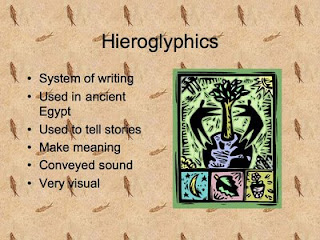
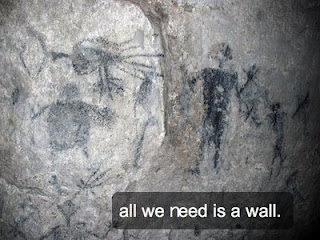
If your students are presenting on hieroglyphics, which slide looks better to as an audience member? Which slide intrigues you more? Which slide requires more presenter involvement and knowledge?


or...


When I am sitting back in the audience grading a presentation, I want to see slide #2! I have created - back in the days of primitive powerpoint (insert golf clap for alliteration! Teaching moment!) - and have sat through numerous presentations using slide #1 and it is torture to an audience member.

Two years ago our assistant principal gave a powerpoint presentation using a stoic white backdrop that was flanked by default black text. Despite numerous misspellings, the powerpoint was a flop. A flop in the vein of The Love Guru.

My point is that no matter what housing forum we use to share and embed our powerpoints, we need to understand that powerpoint is a tool for a presenter; it is not intended to replace the presenter. As teachers we must also employ this same method when presenting to our students. Many times we don't practice what we preach and torture our students with text laden powerpoints that go on for days.

The next time you create a powerpoint for your students, think about how it would feel to view the same powerpoint you just created. What effect will it have on learning? If you are just dictating notes via a powerpoint to usurp valuable class time, then simply give them a hand out or post the note filled powerpoint on your class wiki for students to view at home, take notes and then discuss the next day in class. This will surely save class time and your students will love you for it!

I'm not saying that SlideShare will change the way we present, but it gives us an option to display the powerpoints we want, while providing a central location for viewing and sharing them.

I hope this helps in your classroom and I always welcome feedback!


Monday, 27 April 2009

SlideShare is Everywhere!

Have you ever plugged in your flash drive into a laptop, opened a powerpoint presentation and it doesn't work? Have your students ever done the same thing, and used technology downfall as an excuse to get out of presenting? Have you ever wanted to embed your powerpoint slides on a wiki to share with students and parents? If you answered yes to all of the above then I have your solution.


Slideshare is a site that allows users to upload, store and share powerpoint slide presentations. Slideshare gives you the ability to have your powerpoints at your disposal where ever you go and the best part is that it is totally free!

Last year while I was teaching 1984, I utilized slideshare with my students who were presenting chapters of the novel to the class. I introduced them to slideshare and they were able to upload their presentations and then post them on our class wiki. If you reference my earlier post on wikis in the classroom, you will see that I had students maintain a daily log of their work on the presentations. They had to provide progress, group tasks and any documents they would be handing out during their presentation. Here are two of the examples that students used via slideshare.


You will notice that once the presentations are embedded into your blog or wiki, they allow you to utilize most of the functions that is alloted in a presentation program. Also, teachers can utilize this with all of their presentations they use in the classroom. You can even email them to students if they missed a class in which you gave a presentation. Slideshare is also useful for professional development classes and workshops. It is one way in which you can share your presentations and student work without having to locate, find and sync a flash drive.

Students and colleagues alike can follow along with a slideshare presentation as well. If teachers embed their slideshare presentation to a blog or wiki, students and faculty can follow along on their laptops. This may assist students who have trouble following slides or if students wish to use the presentation as a study guide later in the unit.

I hope you enjoyed this idea and would like to hear feedback about how you utilized slideshare in your own classroom!

Tuesday, 21 April 2009

Evernote Will Organize Your Life!

Today I will be beginning my two part series for Earth Day! These two lessons will help you reduce paper usage in your classroom, library and school building, while educating your students with great web tools for research and presentation. However, be careful of jealous colleagues when you are suddenly viewed as the “green teacher”. I was told once that I was, “making everyone else look bad and ignorant.” This comment came after I began piloting my paperless classroom. I put a lot of time and effort into reducing paper in my classroom, only to be scoffed at by several colleagues who were not willing to…

  1. Try something new after 30 years of teaching
  2. Improve their classroom organization and reduce clutter
  3. Enjoy their prep period rather than spend it fighting with the copier

Enough about my ranting and on to the content for today! Go GREEN!

Today I am presenting a wonderful web-clipping tool that both teachers and students can use in a variety of ways. The tool is called Evernote. Evernote can be downloaded on to MAC and Windows operating systems and is completely free. This can also be used on smart phones and the iPhone.

Here is an introduction to the basic features of Evernote


Evernote allows you to gather clippings from various websites without having to bookmark every single site you enjoy. In short, you can select the text and photos that are of importance to you! So, let’s consider Evernotes practicality in the classroom.

Language Arts/History

Think about students doing research. The teacher gives his or her students a credible, academically authored list of websites. This list can be posted on the class wiki or moodle in order to save all the future trees that will be planted tomorrow! Students review the sites and find a piece of information they really like on George Orwell. However, time is running out and for most students they would immediately select FILE > PRINT. And what prints out? The entire web page! (Insert old school Mr. Yuck sticker here!). The student takes the 15 pages that just printed out, stuffs it into a folder and forgets that good bit he or she was reading right before the sound of the bell. This is the old way. Let’s have our students try the new way!

Art/Graphic Design

Let’s consider what an art teacher might use Evernote for...

Using Evernote in the classroom is always a great way to help students understand the importance of a “Tag”. Provide students with a mini lesson on tagging and how it can save them time when conducting research.

I hope this has been a valuable asset to your class and look forward to hearing how you use Evernote in your class!


Tuesday, 14 April 2009

Rethinking Current Events with Newsvine


If there is one thing students and teachers despise it's clutter. One way teachers create clutter is asking students to print out a current event. Students print out weekly current events, read and summarize it, have it graded and then throw it out. I found more current events lying on my floor or in my trash than any other classroom document. Cringing already teachers? Fear not! I have a environmentally friendly solution that will surely net you Environmental Teacher of the Month.

The process will not only cleanup your classroom and tag you as the "Green" teacher, but you will enhance the discussion and debate in your classroom. Students will be interested in what they read because they are engaging and collaborating with their peers through a threaded discussion. I have found that students speak volumes via the web based forum as opposed to the prompt and answer method. Think of the amount of content students send and receive from each other on facebook daily! Imagine if you could take this enthusiasm and translate into the academic arena. Let's get students discussing the economic stimulus like they debate the relationship of...of...(insert popular "it" couple here).

I found a way for Social Studies and Civics/Government teachers to replace the old printed paper current events with a practical web 2.0 solution! Here is a brief introduction to newsvine.com and how it can supplant paper current events.


Hopefully these eloquently narrated videos will help you set up your class newsvine group.

Positive Outcomes of this Lesson
  1. Students have an archive of current events to look back on throughout the semester.
  2. Teachers can design a rubric for the discussion forum and then quiz students on current events.
  3. Invite parents and administration to participate in the discussion. A great way of allowing parents to participate in the learning process.
  4. Creates a fourum to facilitate classroom discussion
  • Students can lead the class in discussion and answer questions gleaned from the discussion thread.
  • Create a debate session based off current event discussion.
Recommendations
  1. Become familiar with the newsvine site before you start using it in your classroom.
  2. Take time to instruct students on how to properly utilize this site and provide a handout on your class wiki or moodle for reference.
  3. Make sure you set your classroom group to private before going forward.
  4. Create a teacher made rubric that covers all of the content you want to assess on the site. Many times students get online and forget about spelling, grammar and providing acceptable academic content.
  5. Consult Administration, Technology director and parents before creating this forum.
  6. Invite all the members of #5 to join in and even participate in the online group discussion forum.
  7. Enjoy the idea of saving trees and limiting the use of paper (CLUTTER) in your classroom!